
Implementing a Warehouse Management System (WMS) is one of the most impactful decisions a warehouse can make.
A well-planned WMS improves accuracy, reduces operational waste, increases visibility, and brings structure to every
warehouse process. However, a WMS is not just a software installation — it is an organizational transformation.
Successful implementation depends on preparation, clear roles, accurate master data, disciplined execution, and measurable KPIs.
Many SMEs ask whether a WMS is too complex or too costly for their warehouse. The truth is that the success of a WMS
depends far more on planning than on budget. A warehouse with clear processes, consistent storage logic, accurate product data,
and trained operators will always implement a WMS faster and more effectively. The purpose of this page is to provide a practical,
structured guide to help SMEs prepare, plan, and evaluate a WMS implementation from a strategic and operational perspective.
1. A Practical Blueprint Structure for SMEs
A WMS Blueprint should be simple, visual, and operational — not a theoretical document.
A strong blueprint typically contains:
- Process Mapping (Receiving → Putaway → Picking → Packing → Dispatch)
- Location architecture (aisles, levels, zones, pick faces, reserve)
- Product Attributes Model (dimensions, pick units, replenishment rules)
- Exception Scenarios (damaged goods, stock differences, partial pallets)
- Operator Roles and Access Rights
- Equipment & Device Mapping (scanners, printers, forklifts)
- KPIs & Reporting Needs
- Integration Requirements (ERP, TMS, Labeling, Accounting)
SMEs often ask how detailed a blueprint should be.
Answer: Just detailed enough to ensure consistency — not so complex that nobody reads it.
2. Project Objective
The goal of a WMS implementation is to automate critical warehouse operations and align them with ERP,
transportation, and courier systems.
Key expected benefits:
- Increased efficiency in receiving, storage, and picking
- Error reduction in order preparation
- Real-time visibility of stock and movements
- KPI-based performance monitoring
3. Scope of Implementation
- Warehouse type: Traditional (non-automated)
- Processes covered: Receiving, storage, picking, packing, shipping, returns
- Integrations: ERP system, courier/TMS
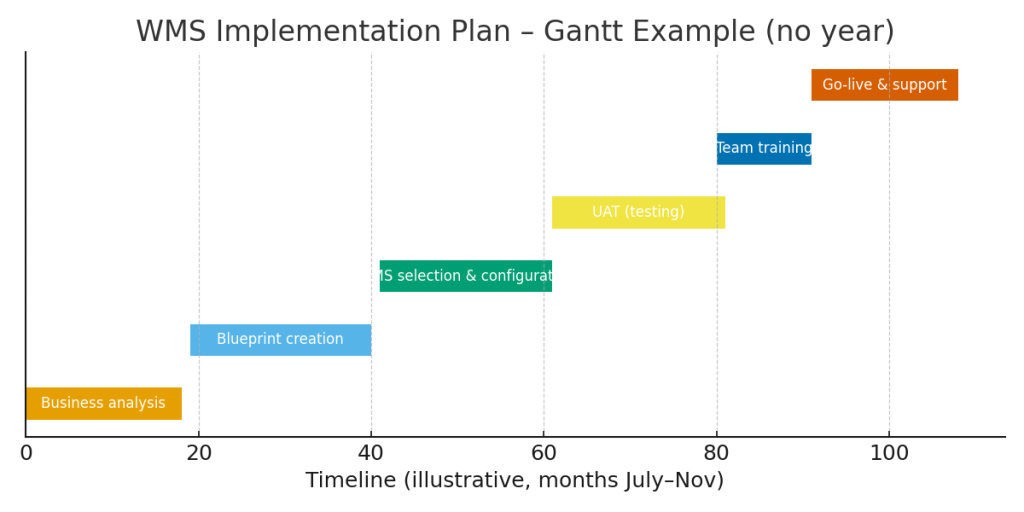
4. Implementation Roadmap (Gantt Chart)
- Business analysis: July 22 – August 9
- Blueprint creation: August 10 – 31
- WMS selection & configuration: September 1 – 20
- UAT (user acceptance testing): September 21 – October 10
- Team training: October 5 – 15
- Go-live & support: October 16 – November 1
5. Roles & Responsibilities (RACI Matrix)
- Project Manager: Accountable for approvals, ensures project delivery
- IT Consultant: Responsible for blueprinting, testing, and support
- WMS Vendor: Configures, trains, and supports system
- Operations: Provides input, validates processes
- Top Management: Oversees and validates key decisions
6. Service Level Agreements (SLA)
| SLA Type | KPI Example | Target |
|---|---|---|
| Delivery time | 98% of orders shipped within 24h | > 98% |
| Picking accuracy | Errors below 0.5% | > 99.5% |
| Receiving time | Completed in max. 4h | 95% < 4h |
| Stock availability | Coverage of active items | > 97% |
| Returns processing | Validated within 48h | > 90% |
7. RAID Register
- Risks: Delays in WMS license delivery, lack of operational team involvement
- Assumptions: Full ERP data access, vendor support available
- Issues: Misalignment between current processes and WMS standard configuration
- Dependencies: IT infrastructure readiness, signed vendor contract
8. Automated WMS Processes
- Receiving with ASN & barcode scanning
- Automatic slotting (location assignment)
- Optimized picking (wave, batch, RF scanning)
- Guided packing & consolidation
- FIFO/Lot/Expiry traceability
- Automated cycle counting
- Courier integration & AWB generation
- Real-time KPI dashboard & SLA alerts
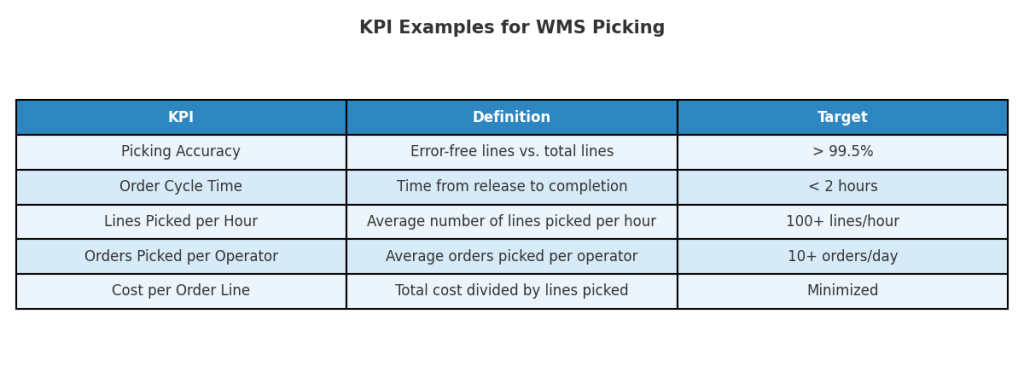
9. KPI Focus for Picking
Efficient order picking is a cornerstone of WMS performance. Common KPIs include:
- Picking accuracy (%): error-free order lines vs. total lines
- Order cycle time: time from order release to completion
- Lines picked per hour (productivity): average output per operator
- Orders picked per operator: workload balance
- Cost per order line picked: efficiency of resources used
These KPIs ensure continuous monitoring and improvement of warehouse operations.
Warehouse managers often ask which KPI matters most ?
Answer: Stock accuracy — everything depends on it.
10. Example:
WMS Implementation in a 12-Operator Warehouse
A mid-sized warehouse implemented a WMS over 10 weeks.
Key actions taken:
- cleaned and standardized location codes
- consolidated product master data
- trained operators using real scenarios
- mapped all exceptions
- created KPI dashboards
- tested receiving, picking, and replenishment flows
Results after 6 months:
- stock accuracy increased from 88% → 98%
- picking productivity improved by 22%
- customer complaints dropped by 40%
The example shows that structured preparation is more important than the software itself.
11. The Most Common Implementation Mistakes
- unclear location architecture
- incorrect or incomplete product master data
- insufficient operator training
- skipping exception scenarios
- no pilot test or isolated testing
- poor communication between teams
- expecting the WMS alone to “fix” process issues
Avoiding these mistakes can reduce implementation time by 20–30%.
Conclusion
A successful WMS implementation plan combines structured project management (Gantt, RACI, RAID),
strict performance targets (SLA), and continuous monitoring through KPIs.
By following this roadmap, companies secure a smooth transition to a digital warehouse environment that
improves accuracy, speed, and scalability.
More about WMS Blueprint Best Practices